Integrations
Attio
Look up records before routing, route to owners and sync people and companies.
The Attio integration makes your CRM part of every routing decision. Before a router evaluates its paths, Cauliflower looks the lead up in Attio, so you can route on any person or company attribute and send existing accounts straight to their owner. After routing and booking, it writes back: people and companies, meeting notes, deals and the record owner.
The integration is workspace-wide and connected once by an admin.
Create an access token
Open the developer settings
In Attio, go to Workspace settings → Developers and create a new access token. Name it something recognizable, like "Cauliflower".
Grant the scopes
Give the token read and write access to the following:
| Scope | Why Cauliflower needs it |
|---|---|
| Records | Look up people and companies, create and update them, create deals and set the owner attribute. |
| Object configuration | List attributes so you can pick the owner attribute. |
| Notes | Log meetings as notes on the person. |
| Workspace members | Turn record owners into email addresses so they can be matched to your teammates. |
Copy the token
Copy the token value. You'll paste it into Cauliflower next.
Connect Attio
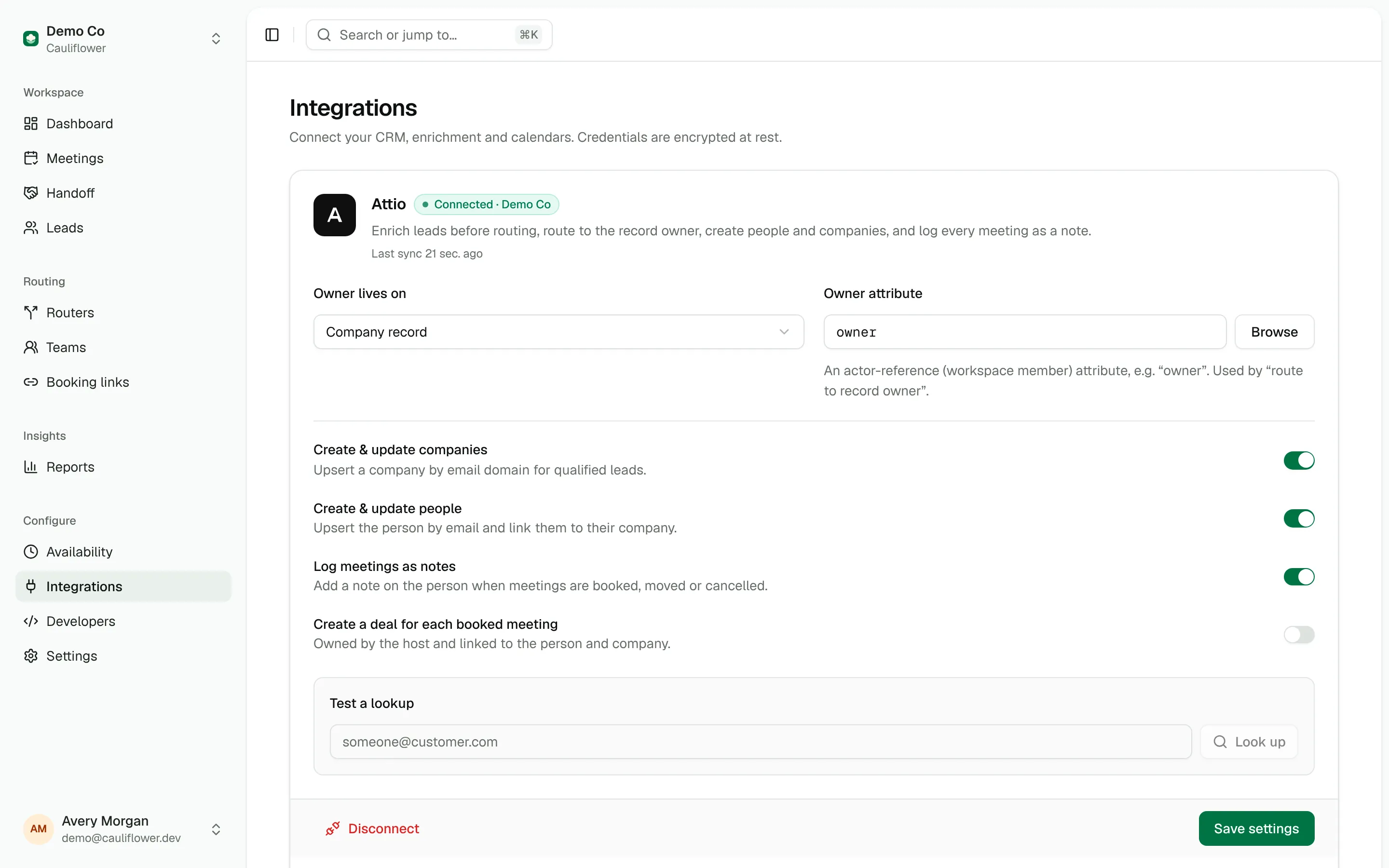
Open Integrations, paste the token into the Attio card and click Connect. Cauliflower checks the token with Attio and shows "Connected" with your Attio workspace name. Tokens are encrypted at rest. Only workspace admins can connect, configure or disconnect the integration.
Once connected, the card shows the integration's settings, the time of the last sync and the most recent error, if any.
Choose where the owner lives
Owner-based routing needs to know which attribute holds the record owner.
- Owner lives on: Company record (the default) or Person record. Most teams own accounts at the company level.
- Owner attribute: an actor-reference attribute that points to an Attio workspace member. The default is
owner. Click Browse to pick from the actor-reference attributes on that object, or type a slug such asaccount_executive.
Click Save settings after changing anything on the card.
Test a lookup
Enter an email under Test a lookup and click Look up. The result is exactly what a router sees: whether the person and company exist, their attributes and the resolved owner_email. It's the fastest way to check field names before you write conditions.
Lookup before routing
Every router has a Lead matching & enrichment step that runs before the paths. With Match against your CRM on (the default for new routers), Cauliflower:
- Finds the person in Attio by email.
- Finds the company by the email's domain. Personal email domains such as gmail.com are skipped. If no company matches the domain but the person is linked to a company, that company is used.
- Reads the owner attribute from the company or person record and resolves it to the owner's email address.
Everything it finds becomes fields you can use in path conditions:
| Field | Value |
|---|---|
crm.person.exists | true when a person with this email exists. |
crm.company.exists | true when the company exists. |
crm.owner_email | Email of the record owner, or empty. |
crm.person.<attribute> | Any person attribute by its slug, such as crm.person.job_title. |
crm.company.<attribute> | Any company attribute by its slug, such as crm.company.categories or a custom crm.company.tier. |
crm.person.url, crm.company.url | Links to the records in Attio. |
Attribute values are simplified so they're easy to compare: select and status attributes become the option title, workspace members become their email, locations become "City, Region, Country code", currency becomes a number and names become the full name. Attributes with several values become a list, which works with is, contains and is any of. Number comparisons on ranges like 51-200 use the lower bound.
crm.company.exists          is true
crm.company.tier            is any of   Enterprise, Strategic
crm.company.employee_range  greater or equal   250
If Attio is unreachable or returns an error, routing continues as if the lead weren't in the CRM, and the error is shown on the Attio card.
Route to the record owner
To send existing accounts to their owner:
- Add a path with the rule type CRM ownership. It matches leads whose account already has an owner. You can add conditions that must also pass.
- Add a Display calendar step and set Show availability of to Record owner.
- Pick the owner source: Attio, then previous Cauliflower owner (the default), Attio record owner only or Previous Cauliflower owner only.
- Choose a fallback team or person under If the owner isn't a member, fall back to.
The owner's email is matched to an active member of your Cauliflower workspace. When there's no owner, or the owner isn't a member, the fallback team or person is used, and failing that the meeting type's own hosts. The Account-based routing guide walks through a full setup.
Enrichment source
Attio is the first source in the enrichment waterfall. When the person or company exists, Cauliflower fills the normalized enrichment.* fields from Attio and sets enrichment.source to attio:
| Enrichment field | From Attio |
|---|---|
enrichment.title | Person job_title |
enrichment.country, enrichment.city | Person primary_location |
enrichment.linkedin_url | Person linkedin |
enrichment.company_name, enrichment.company_domain | Company name, domains |
enrichment.industry | Company categories |
enrichment.employees | Company employee_range (lower bound) |
enrichment.revenue | Company estimated_arr_usd (lower bound) |
enrichment.company_country | Company primary_location |
enrichment.founded_year | Company foundation_date |
With Apollo in its default When not in CRM mode, Apollo is only called for leads Attio doesn't know, which saves credits. In Always mode, Apollo fills the gaps and Attio's values win. See Apollo.
Writing back to Attio
Writes happen in the background after routing or booking, so they never slow the visitor down. Failed writes are retried automatically, and the latest error is shown on the Attio card and on the affected lead or meeting.
People and companies
Add an Update CRM step to a path and turn on Create or update person & company. After the lead is routed:
- The company is upserted by email domain when Create & update companies is on. Personal email domains are skipped.
- The person is upserted by email when Create & update people is on, with their first and last name, and their phone number if it's in international format (for example
+14155550123). When a company was created or updated in the same sync, the person is linked to it through theircompanyattribute.
Existing records are updated rather than duplicated. The lead page links to the Attio person and company records once they're synced.
Meeting notes
With Log meetings as notes on, every booked, rescheduled or cancelled meeting adds a note to the invitee's person record, whatever the meeting's source. If the lead isn't linked to an Attio person yet and Create & update people is on, the person is upserted first.
The note includes the meeting type and host, the time, the video link or location, the source and router, who booked it in Handoff, the cancellation reason, Handoff notes, the guest form answers and a link to the meeting in Cauliflower.
Deals
Turn on Create a deal for each booked meeting to open a deal when a meeting is booked. The deal is named after the company (or the invitee) and the meeting type, owned by the host and associated with the person and, when known, the company. Set Deal stage to the exact title of a stage in your Attio deals pipeline. One deal is created per meeting.
Owner write-back
Cauliflower can set the owner attribute you configured to the rep it assigned or booked:
- On an Assign to step, turn on Write the owner back to Attio.
- Or, on an Update CRM step, turn on Set the record owner. On a path with an Assign to step, the assigned rep is written right after routing. On a calendar path without one, the rep who gets booked is written when the meeting is booked.
The rep's email is written to the owner attribute on the company or person record, depending on Owner lives on. If the records don't exist yet, they're created first. You can also change a lead's owner from the lead page with Also update owner in Attio turned on.
Disconnecting
Disconnect on the Attio card removes the token. Routers stop looking leads up, conditions on crm.* fields see no CRM data, and owner-based paths fall back to their fallback teams. Data already stored on leads and meetings is kept.